Configuring LDAP authentication
To enable authentication of Orchestra users by an external LDAP server, you must first configure the access parameters for that server.
Begin by selecting Settings in the menu. Next, click on the Environment settings tab and select the group named LDAP authentication.
In this tab, you will set the connection parameters for the LDAP server, the credentials that Orchestra uses to authenticate itself to the LDAP server (if applicable), and the request pattern or, alternatively, a base DN and a search filter.
The following illustration shows the settings available within the LDAP group:
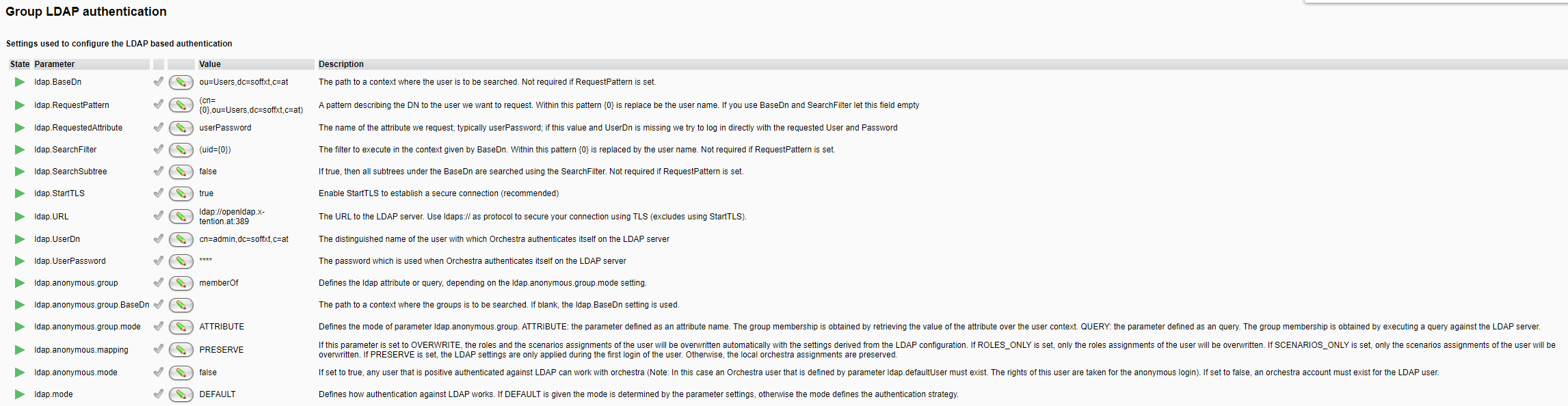
Configuration of the Authentication Mode
Starting with Orchestra 4.9.0.1, the authentication execution type against the LDAP directory can be defined with the attribute ldap.mode. If this attribute is set to DEFAULT, the authentication type is derived from the provided parameter settings. The following modes are supported:
| Type | Description |
|---|---|
| Bind | This LDAP strategy attempts to connect directly to the LDAP directory using the credentials provided during login. This mode is commonly used with Microsoft's Active Directory due to the absence of a visible password attribute. Specify the following attribute to enable this LDAP mode: ldap.RequestPattern. |
| LoadCompare | This strategy loads a user by a list of user DNs and compares it against the password attributes found in the LDAP directory. Specify the following attributes to enable this LDAP mode: ldap.RequestedAttribute, ldap.RequestPattern. If authentication is required for the user search, provide the account by setting ldap.UserDn, ldap.UserPassword. |
| QueryBind | This method uses a search query to locate user objects in the LDAP directory. If a user is found, authentication occurs directly against the LDAP directory with the provided password. Specify the following attributes to enable this LDAP mode: ldap.BaseDn, ldap.SearchFilter, ldap.SearchSubtree. If authentication is required for the user search, provide the account by setting ldap.UserDn, ldap.UserPassword. |
| QueryCompare | This strategy uses a search query to find a user object. If a user object is located, the password is compared with the password attribute in the LDAP directory. Specify the following attributes to enable this LDAP mode: ldap.BaseDn, ldap.SearchFilter, ldap.SearchSubtree, ldap.RequestedAttribute. If authentication is required for the user search, provide the account by setting ldap.UserDn, ldap.UserPassword. |
LDAP Attributes Description
| Attribute | Description |
|---|---|
ldap.BaseDn | The path to a context where the user is to be searched. This attribute is not required if RequestPattern is set. Example: ou=Users,dc=soffxt,c=at |
ldap.RequestPattern | A pattern describing the DN of the user to request. Within this pattern, {0} is replaced by the user name. Example: (cn={0},ou=Users,dc=soffxt,c=at) |
ldap.RequestedAttribute | The name of the requested attribute; typically userPassword. Example: userPassword |
ldap.SearchFilter | The filter to execute in the context defined by BaseDn. In this pattern, {0} is replaced by the user name. Example: (uid={0}) |
ldap.SearchSubtree | If set to true, all subtrees under the BaseDn are searched using the SearchFilter. This is not required if RequestPattern is set. |
ldap.StartTLS | Enables StartTLS to establish a secure connection (recommended). |
ldap.URL | The URL of the LDAP server. Use ldaps:// as the protocol to secure your connection with TLS (this excludes the use of StartTLS). |
ldap.UserDn | The distinguished name of the user used for Orchestra authentication on the LDAP server. Example: cn=admin,dc=soffxt,c=at |
ldap.UserPassword | The password used when Orchestra authenticates itself on the LDAP server. |
ldap.anonymous.group | Defines the LDAP attribute or query based on the ldap.anonymous.group.mode setting. |
ldap.anonymous.group.BaseDn | The path to a context where the group is searched. If left blank, the ldap.BaseDn setting is used. |
ldap.anonymous.group.mode | Defines the mode for the ldap.anonymous.group parameter. - ATTRIBUTE: retrieves the value of the attribute over the user context to obtain group membership. - QUERY: executes a query against the LDAP server to obtain group membership. |
ldap.anonymous.mapping | Defines the mapping overwrite mode. - OVERWRITE: user roles and scenarios are automatically overwritten with settings from the LDAP configuration. - ROLES_ONLY: only the role assignments are overwritten. - SCENARIOS_ONLY: only the scenario assignments are overwritten. - PRESERVE: LDAP settings apply only during the first login; subsequent local assignments are preserved. |
ldap.anonymous.mode | If true, any user successfully authenticated against LDAP can use Orchestra. (Note: An Orchestra user defined by the parameter ldap.defaultUser must exist; this user's rights are assigned for anonymous logins). If set to false, an Orchestra account must exist for the LDAP user. |
ldap.mode | If true, all subtrees under the BaseDn are searched using the SearchFilter. This is not required if RequestPattern is set. |
ldap.anonymous.mapping | If set to OVERWRITE, user roles and scenarios are automatically overwritten with settings from the LDAP configuration. If ROLES_ONLY is set, only role assignments are overwritten. If SCENARIOS_ONLY is set, only scenario assignments are overwritten. If PRESERVE is set, LDAP settings apply only during the first login; local assignments are preserved thereafter. |
ldap.anonymous.group.mode | Defines the mode for the ldap.anonymous.group parameter: - ATTRIBUTE: retrieves the value of the attribute over the user context for group membership. - QUERY: executes a query against the LDAP server for group membership. |
ldap.anonymous.group | Defines the LDAP attribute or query based on the ldap.anonymous.group.mode setting. Example for ATTRIBUTE mode: memberOf Example for QUERY mode: (& (member=$(dn))(objectClass=Group)) |
ldap.anonymous.group.BaseDn | The path to a context for group searching, applicable for QUERY mode. If left blank, the ldap.BaseDn setting is used. |
With the ldap.anonymous.mode parameter enabled, you can specify the type of authentication. If set to true, Orchestra allows anonymous authentication. In this mode, Orchestra attempts to authenticate the user against the LDAP directory without a configured user in the internal Orchestra user database. If ldap.anonymous.mode is set to false, only users that exist in the Orchestra user repository can be authenticated against LDAP.
Refer to the subsections Configuration of Anonymous Authentication and Configuration of User Bound LDAP Authentication for a detailed description of the configuration process.
When you log in as an LDAP user, Orchestra queries the LDAP server for the specified requestedAttribute (typically UserPassword) and compares it with the entered password. If this process fails, you can find more detailed log information by setting the log level for emds.runtime.security to FINE.
To adjust the logging, add the following line in the configuration file logging.properties:
emds.runtime.security.level = FINE
Upon successful login, you should see lines in the orchestra.mlog file similar to the following:
09.12/13:43:56.771   INFO   [176]   AuthenticationService.authenticate: authenticate user Monitor using LDAP

09.12/13:43:56.772   INFO   [176]   AuthenticationService.createDirContext: create directory context using: {java.naming.provider.url=ldap://openldap.x-tention.at:389,...}

09.12/13:43:57.038   FINE   [176]   AuthenticationService.getUserByPattern: get user cn=Monitor,ou=Users,dc=soffxt,c=at; lookup attribute userPassword
If authentication fails, you will also find an error message in the log file.
Using an Encrypted Connection
To secure communication with the LDAP server at the transport layer, you have two options: TLS and STARTTLS.
When using TLS, Orchestra connects directly to the LDAPS port (typically 636) of the server. In contrast, STARTTLS initiates an unencrypted connection on the standard LDAP port (typically 389) and then upgrades that connection by negotiating encryption details with the server.
Enable TLS
To enable TLS, use the prefix ldaps:// in the ldap.URL parameter. Ensure that you change the port as necessary.
Enable STARTTLS
To enable STARTTLS, leave the ldap.URL parameter unchanged but enable ldap.StartTLS (this is the default behavior).